- Startseite /
- Elektronik /
- Computers, Laptops and Tablets /
- Computer Accessories /
- Docking Stations & Locks /
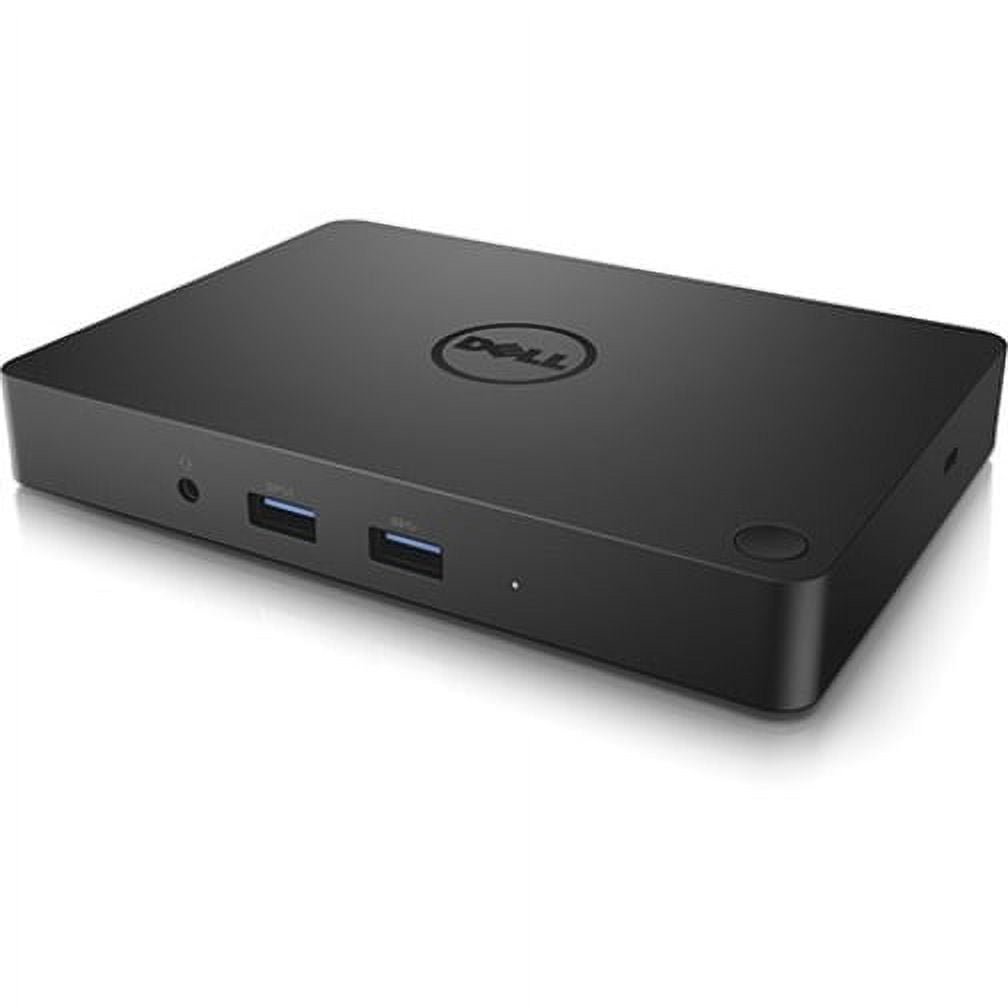
- Dell WD15 Docking Station
0 ratings

Artikelnr.:
63203714
Dell WD15 Docking Station
Artikelnr.:
63203714
CHF 63
Price Details
Excluding Shipping & Custom charges ( Shipping and custom charges will be calculated on checkout )
*All items will import from USA
0 ratings
Schreiben Sie eine Bewertung
Auf Lager
 Vom USA Store für Sie importiert
QTY:
Bestellen Sie jetzt und erhalten Sie es am Mittwoch, August 19
Gesicherte Transaktion
Ubuy ist bestrebt, Ihre Sicherheit und Privatsphäre zu schützen. Unser fortschrittliches Zahlungssicherheitssystem gewährleistet Vertraulichkeit, indem Ihre Daten während der Übertragung mit AES (Advanced Encryption Standards) und SSL (Secure Socket Layer) Protokollen verschlüsselt werden. Ihre Zahlungsdaten sind 100% sicher, da wir Ihre Zahlungsdaten nicht an Drittanbieter weitergeben.
Unsere besten Logistigpartner


Elevate your workspace with the Dell WD15 Docking Station, offering unmatched connectivity with 5 USB ports and dual display options!

Fast
Shipping

Kostenlose
Rücksendung*

Sichere Verpackung

100 % Originalprodukte

PCI DSS-Standards

ISO 27001-zertifiziert


Note: Step Down Voltage Transformer required for using electronics products of USA store (110-120). Recommended power converters Jetzt kaufen.


Besondere Merkmale
Vielseitige Konnektivität
Offers multiple ports including USB-C, HDMI, and Ethernet, seamlessly connecting various devices for enhanced productivity in a single connection.
Power Delivery
Delivers up to 130W of power through USB-C, charging laptops while enabling data transfer, ensuring devices stay powered all day without extra chargers.
Kompaktes Design
Space-saving and portable design makes it ideal for home offices and workspaces, providing functional expansion without clutter.
Produktdetails
- Dell WD15 Docking Station with USB Type C interface
- 5 x USB Ports, including 3 x USB 3.0 and 2 x USB 2.0
- Features HDMI, VGA, and Mini DisplayPort for video output
- Includes Network (RJ-45) port and Audio Line Out
- Connectivity via Thunderbolt technology
- California Proposition 65 warning: n/a
| Kompatibilität | Latitude 15 (E5570), Precision 15 (3510), Precision 15 (5510), Precision 15 (7510), Precision 17 (7710), XPS 15 (9550) |
| Inputs/Outputs | 5 x USB Ports, 2 x USB 2.0, 3 x USB 3.0, Network (RJ-45), HDMI, VGA, Mini DisplayPort, Audio Line Out, Thunderbolt |
| Usb version | USB 3.0 |
| Eingangs-/ausgangsmenge | 5 |
| Marke | Dell |
| Modellname | WD15 |
| Hat schriftliche Garantie | Nein |
| Farbe | Schwarz |
| Gewicht | 1 lbs (450 grams) |
| Eingangs-/ausgangsrichtung | Bi-Directional |
Für wen ist das Produkt geeignet?

-
Geschäftsprofis
Ideal for users needing multiple displays and connectivity options for efficient multitasking and productivity in office environments.
-
Häufige Reisende
Great for users who require a portable docking solution that easily connects laptops to external devices when on the go.
-
Creative Designers
Perfect for designers utilizing high-resolution monitors and diverse peripherals for graphic design, video production, or 3D modeling.

-
Gaming-Enthusiasten
Not suitable for gamers seeking high performance, as it may not provide the necessary bandwidth for gaming peripherals.
PRODUKTBESCHREIBUNG
Dell WD15 Docking Station
Haben Sie eine Frage? Mit uns chatten
Kunden Fragen und Antworten
-
Frage:
What types of USB ports does the Dell WD15 Docking Station have?
Antworten: The docking station has a total of 5 USB ports, comprising 3 USB 3.0 and 2 USB 2.0 ports. -
Frage:
Can I use multiple displays with the Dell WD15 Docking Station?
Antworten: Yes, the docking station supports both HDMI and VGA connections for dual display setups. -
Frage:
Is the Dell WD15 Docking Station easy to set up?
Antworten: Absolutely! It features a simple plug-and-play setup via the USB Type C connection for quick installation.
Dell Docking Stations & Locks Editorial Review
The Dell WD15 Docking Station offers a robust solution for users seeking to streamline their workspace and enhance their connectivity options. Designed specifically for devices like the XPS 13 9315, this dock stands out for its single power button feature, which allows users to power on their laptops easily and reduce desktop clutter. Users have noted that the WD15 maintains a cool operation, which is a Considerable improvement over other hubs that may experience overheating during extensive use. With an HDMI port capable of supporting a 4K monitor, along with several USB 3.0 and Ethernet ports, the docking station serves adequately for light office tasks. While it excels in basic functionality, it does have some limitations. Users have expressed disappointment over the necessity of a dedicated dongle to utilize the DisplayPort, as well as the requirement of initial setup time, including a couple of reboots. The lack of built-in USB-C support and the use of a traditional barrel plug instead of a more modern USB PD design has also raised concerns about the device's future-proofing capabilities. Nonetheless, the WD15 provides a user-friendly interface for managing multiple peripherals while ensuring decent functionality for everyday tasks. For those with more advanced needs, like multiple 4K displays or numerous external drives, alternative, higher-end docks might be worth Considering. However, the WD15 presents a compelling option for users looking for a reliable docking station without breaking the bank. **
Kundenbewertungen
1 Kundenbewertungen
-
5 Sterne
100%
-
4 Sterne
0%
-
3 Sterne
0%
-
2 Sterne
0%
-
1 Sterne
0%
Bewerten Sie dieses Produkt
Teilen Sie Ihre Meinung mit anderen Kunden
Vorteile
- Single power button simplifies startup.
- Good selection of ports for basic connectivity (HDMI for 4K, multiple USB 3.0, Ethernet).
- Reduces desk clutter compared to having multiple cables.
Nachteile
- Requires a dongle for DisplayPort connectivity.
Platform Trust & Buyer Confidence

MA
Mohammad
Verified buyer
“Excellent quality and original too,when ubuy send original things I will appreciate that ,I very satisfied thank you”
23 July 2026 · via Trustpilot
CK
Chitra
Verified buyer
“The order and delivery progress was communicated very well. Package arrived within the estimated time. Products arrived as expected in good condition.”
22-Jul-26 · via Trustpilot
K
kund
Verified buyer
“Good supply of products. Safe payment methods, and shipment worldwide! Genuine products.”
23-Jul-26 · via Trustpilot
OO
Onesi
Verified buyer
“Was my first time buying a product from Ubuy, but I found it so helpful. This is reliable. Gonna place a new order!”
22 July 2026 · via Trustpilot
SJ
SAO JOHN
Verified buyer
“Ubuy is a great online platform to buy stuff. Reliable, fast delivery time and great value for money. I've been using Ubuy online shopping platform for three years now and will continue to do so.”
23 July 2026 · via Trustpilot
Sicheres Bezahlen
Global Delivery
Einfache Rückgabe
Genuine Products
Produktpreisverlauf
Wichtige Information
- Einschränkungen: Für international versandte Produkte beachten Sie bitte, dass jegliche Herstellergarantie nicht gültig sein könnte; Herstellerservice-Optionen nicht verfügbar sein könnten; Produkthandbücher, Gebrauchsanleitungen und Sicherheitshinweise nicht in der Sprache des Ziellandes verfasst sein könnten; die Produkte (und Begleitmaterialien) könnten nicht im Einklang mit den Standards, Spezifizierungen und Etikettierungsvorgaben des Ziellandes entworfen sein; und die Produkte könnten nicht der Voltzahl und anderen elektrischen Standards des Ziellandes entsprechen (weshalb, falls zutreffend, die Verwendung eines Adapters oder Umwandlers erforderlich sein könnte). Der Empfänger ist dafür verantwortlich sicherzustellen, dass das Produkt legal in das Zielland importiert werden kann. Bei der Bestellung von Ubuy oder seinen Partnern ist der Empfänger der eingetragene Importeur und muss sich an alle Gesetze und Regulierungen des Ziellandes halten.
- Nicht alle auf Ubuy aufgeführten Produkte werden zum Verkauf angeboten, da Ubuy eine globale Suchmaschine ist. Produkte unterliegen Export-/Handelsbestimmungen.
CHF 63
Bestellen Sie jetzt und erhalten Sie es am Mittwoch, August 19
Dieser Artikel unterliegt in meinem Land keinen Beschränkungen. (Klicken Sie bitte auf den obigen Link, wenn dieser Artikel in Ihrem Land keinen Beschränkungen unterliegt. Unser Team wird ihn dann prüfen und zulassen.)
QTY:
Gesicherte Transaktion
PCI DSS compliant and ISO 27001:2022 certified, with encrypted payments and full buyer protection on every order.
Unsere besten Logistigpartner
Schnellste grenzüberschreitende Lieferung
Merkmale und Vorteile
- Maximize productivity with 5 USB ports including 3 USB 3.0 for faster data transfer.
- Supports HDMI, VGA, and Mini DisplayPort for versatile dual display capabilities.
- Connect to the internet effortlessly with a built-in Network (RJ-45) port.
- Designed for a seamless connection via USB Type C technology.
- Ideal for home offices, workspaces, or on-the-go professionals.
- Stable wired connectivity ensures reliability and enhanced performance.
Ubuy Assurance
Experience worry-free shopping with 100% original products, PCI DSS-compliant payment security, ISO 27001-certified data protection, the fastest cross-border delivery, free returns *, and secure packaging on every order.