- Page d'accueil /
- Électronique /
- Computer Accessories /
- Computer Accessories & Peripherals /
- Input Devices /
- Graphics Tablets /
- XPPen Artist12 Pro 11.6 Drawing Tablet with S...
0 ratings

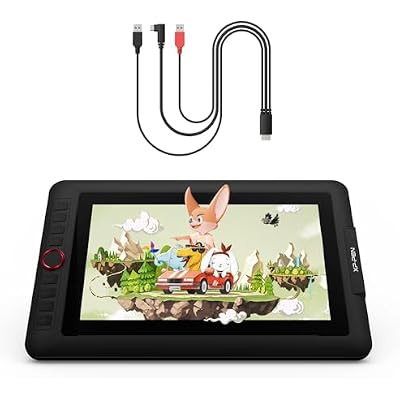
XPPen Artist12 Pro 11.6 Drawing Tablet with Screen Pen Display Full-Laminated Graphics Tablet and XPPen 3-in-1 Cable
0 ratings
Écrire un commentaire
En rupture de stock
 Importé depuis la boutique USA
Transaction sécurisée
Ubuy s'engage à protéger votre sécurité et votre confidentialité. Notre système avancé de sécurité des paiements garantit la confidentialité en chiffrant vos informations lors de la transmission grâce aux protocoles AES (Advanced Encryption Standards) et SSL (Secure Socket Layer). Vos coordonnées de paiement sont 100 % sécurisées car nous ne partageons pas vos informations de paiement avec des vendeurs tiers.
nos meilleurs partenaires logistiques


Experience a real paper-like feel drawing with virtually no parallax and enjoy smoother transitions with up to 60 degrees of tilt function.

Livraison
rapide

Retour
gratuit*

Emballage sécurisé

Produits 100 % originaux

Conformité PCI DSS

Certifié ISO 27001


Note: Step Down Voltage Transformer required for using electronics products of États-Unis store (110-120). Recommended power converters Acheter maintenant.


Ce qui se démarque
Full-Laminated Display
The Artist12 Pro features a full-laminated screen that reduces parallax and enhances color accuracy, providing a seamless drawing experience that closely mimics traditional paper.
Versatile Connectivity
Equipped with a 3-in-1 cable, this tablet offers flexible connectivity options for easy setup with various devices, ensuring compatibility and convenience for artists on the go.
Responsive Pen Technology
With its highly sensitive pen and 8192 levels of pressure sensitivity, users can enjoy precise control and dynamic strokes, making it ideal for both professional illustrators and hobbyists.
Détails du produit
| Item Weight | 3.5 lbs (1.59 kg) |
À qui est-ce destiné ?

-
Digital Artists
Ideal for professional and hobbyist digital artists seeking precise control and vibrant display for their creations.
-
Students & Learners
Great for students in design and art fields wanting a practical tool for creating digital art and illustrations.
-
Graphic Designers
Perfect for graphic designers needing a responsive and portable drawing tablet for designing logos and artworks.

-
Casual Users
Not suitable for casual users or those who only occasionally dabble in digital art or illustration.
-
Budget-Conscious Buyers
Less ideal for those looking for a budget-friendly option, as this model may be on the higher end.
-
Non-Artists
Not recommended for users who don’t engage in artistic tasks, as it may not offer practical value.
DESCRIPTION DU PRODUIT
XPPen Artist12 Pro 11.6 Drawing Tablet with Screen Pen Display Full-Laminated Graphics Tablet and XPPen 3-in-1 Cable
Vous avez une question ? Chattez avec nous
Questions et réponses des clients
-
question:
What are the key features of the XPPen Artist12 Pro Drawing Tablet?
répondre: The XPPen Artist12 Pro Drawing Tablet boasts an 11.6-inch full-laminated screen that provides a stunning visual experience with vibrant colors and minimal parallax. It comes equipped with a pressure-sensitive pen that allows for precise drawing, and it supports tilt functionality, making it ideal for both professionals and beginners. The tablet features customizable shortcut keys, enhancing workflow efficiency, and is compatible with various digital art software, making it versatile for different artistic projects. -
question:
How does the full-laminated display benefit artists?
répondre: A full-laminated display means that the layers of the tablet are fused together, eliminating the gap between the glass and the screen. This results in improved clarity and reduces parallax, allowing artists to see their strokes directly where they apply pressure. This feature enhances the drawing experience, providing a more natural and intuitive feel, crucial for detailed artwork, animations, and graphic designs, making it particularly beneficial for professionals tackling intricate projects. -
question:
What types of software is compatible with the XPPen Artist12 Pro?
répondre: The XPPen Artist12 Pro is compatible with various popular digital art software such as Adobe Photoshop, CorelDRAW, Clip Studio Paint, and Autodesk SketchBook, among others. This versatility allows artists to work with their preferred tools without any limitations. Being adaptable to both Windows and macOS operating systems ensures that a broader range of users can utilize the tablet for digital painting, illustrations, and graphic designs, catering to different artistic preferences easily. -
question:
Can I use the XPPen Artist12 Pro for animation?
répondre: Absolutely! The XPPen Artist12 Pro is an excellent choice for animation due to its responsive pen technology and the ability to create smooth, fluid movements. Artists can leverage the customizable shortcut keys to streamline their animation workflow, making tasks like frame-by-frame animation more efficient. The high-resolution screen provides clear visuals, essential for detailed work, and the tablet's compatibility with animation software makes it a strong tool for animators at any skill level. -
question:
Is the XPPen Artist12 Pro suitable for beginners?
répondre: Yes, the XPPen Artist12 Pro is highly suitable for beginners. Its intuitive setup, responsive pen, and detailed user manual make it accessible for those new to digital art. Beginners can experiment with the tablet's capabilities while enjoying a professional look and feel. The presence of customizable keys aids in learning productivity tools, helping new artists smoothen their learning curve in digital illustrations or graphic design projects. -
question:
What is the resolution of the XPPen Artist12 Pro?
répondre: The XPPen Artist12 Pro features a resolution of 1920 x 1080 pixels, which allows for sharp and detailed graphics. This resolution ensures that even the smallest details in your designs are rendered clearly, resulting in high-quality artwork. For artists and designers working on intricate projects, this level of detail is crucial, as it facilitates precision in drawing and painting, ultimately elevating the overall quality of the final product. -
question:
How does the pen battery life hold up during usage?
répondre: The XPPen Artist12 Pro includes a battery-free stylus, meaning you won’t need to worry about charging it or changing batteries. The pen’s design allows for continuous use without interruptions, giving you the freedom to draw without the concern of battery life. This feature is particularly advantageous for artists who require prolonged drawing sessions, ensuring that creativity isn’t hindered by technical limitations. -
question:
What accessories come with the XPPen Artist12 Pro?
répondre: The XPPen Artist12 Pro package includes the drawing tablet, a stylus pen, an XPPen 3-in-1 cable for connectivity, a user manual, and extra nibs for the pen. The inclusion of these accessories ensures that artists have everything they need to get started right away. The extra nibs also extend the life of the stylus, allowing for continuous use in various artistic tasks, enhancing the overall value of the purchase. -
question:
How do I connect the XPPen Artist12 Pro to my computer?
répondre: Connecting the XPPen Artist12 Pro to your computer is straightforward. You simply use the included XPPen 3-in-1 cable, which connects the tablet to your computer via USB-C. Once connected, you'll need to download and install the appropriate drivers from the XPPen website. This setup process ensures that the tablet can communicate efficiently with your computer, allowing you to start creating right away with your favorite digital art software. -
question:
Where can I buy the XPPen Artist12 Pro in Switzerland?
répondre: You can purchase the XPPen Artist12 Pro 11.6" Drawing Tablet with Screen Pen Display from Ubuy in Switzerland. Ubuy offers a seamless shopping experience for this product, providing access to detailed specifications and customer reviews to help inform your decision. Engaging with Ubuy ensures that you receive authentic products along with accessible customer support, enhancing your overall purchase experience.
XPPen Graphics Tablets Editorial Review
Aucune critique éditoriale trouvée
Avis et évaluations clients
1 évaluations des clients
-
5 étoile
100%
-
4 étoile
0%
-
3 étoile
0%
-
2 étoile
0%
-
1 étoile
0%
Donnez votre avis sur ce produit
Partagez votre avis avec d'autres clients
Historique des prix du produit
Informations importantes
- Limitations : Pour les produits expédiés à l'international, veuillez noter que toute garantie du fabricant peut ne pas être valide ; les options de service du fabricant peuvent ne pas être disponibles ; les manuels, instructions et avertissements de sécurité des produits peuvent ne pas être dans les langues du pays de destination ; les produits (et les matériaux qui les accompagnent) peuvent ne pas être conçus conformément aux normes, spécifications et exigences d'étiquetage du pays de destination ; et les produits peuvent ne pas être conformes à la tension et aux autres normes électriques du pays de destination (nécessitant l'utilisation d'un adaptateur ou d'un convertisseur le cas échéant). Il incombe au destinataire de s'assurer que le produit peut être importé légalement dans le pays de destination. En cas de commande auprès d'Ubuy ou de ses filiales, le destinataire est l'importateur officiel et doit se conformer à toutes les lois et réglementations du pays de destination.
- Tous les produits listés sur Ubuy ne sont pas à vendre, Ubuy étant un moteur de recherche mondial. Les produits sont soumis aux réglementations en matière d'exportation et de commerce.
Currently unavailable.
We don't know when or if this item will be back in stock.
This item is not restrict in my country.(Please click on above link if this item is not restrict in your country, So our team will review and allow.)
Transaction sécurisée
Ubuy s'engage à protéger votre sécurité et votre confidentialité. Notre système avancé de sécurité des paiements garantit la confidentialité en chiffrant vos informations lors de la transmission grâce aux protocoles AES (Advanced Encryption Standards) et SSL (Secure Socket Layer). Vos coordonnées de paiement sont 100 % sécurisées car nous ne partageons pas vos informations de paiement avec des vendeurs tiers.
nos meilleurs partenaires logistiques
Livraison transfrontalière la plus rapide
Caractéristiques et avantages
- Fully-laminated screen minimizes parallax for accurate cursor placement.
- Tilt function supports up to 60 degrees for natural shading.
- Sleek Red Dial enhances workflow efficiency.
- 8 customizable shortcut keys streamline creative processes.
- Compact design with a 11.6-inch display ideal for portability.
- Includes XPPen 3-in-1 cable for seamless connectivity.