- Page d'accueil /
- fournitures industrielles /
- Industrial Electrical /
- Optoelectronic Products /
- Optoelectronic Displays /
- LCD Touch Panels /
- DSD TECH 1.8 Inch TFT LCD Display Module with...
0 ratings

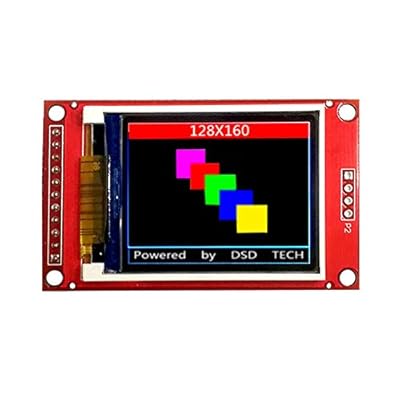
This 1.8 inch TFT LCD display is perfect for electronic enthusiasts and students to use in development boards like Arduino and Raspberry Pi. Only 4 IOs are needed to illuminate the display using SPI communication mode. It supports 16BIT RGB 65K color display, 128X160 resolution, and uses the ST7735s driver chip.
Numéro d'article:
17459427
DSD TECH 1.8 Inch TFT LCD Display Module with SPI Interface for Arduino and MCU
Numéro d'article:
17459427
CHF 17
Price Details
Excluding Shipping & Custom charges ( Shipping and custom charges will be calculated on checkout )
*All items will import from États-Unis
0 ratings
Écrire un commentaire
En stock
 Importé depuis la boutique USA
QTY:
Commandez maintenant et recevez votre commande aux alentours du Mercredi, Juin 24
Transaction sécurisée
Ubuy s'engage à protéger votre sécurité et votre confidentialité. Notre système avancé de sécurité des paiements garantit la confidentialité en chiffrant vos informations lors de la transmission grâce aux protocoles AES (Advanced Encryption Standards) et SSL (Secure Socket Layer). Vos coordonnées de paiement sont 100 % sécurisées car nous ne partageons pas vos informations de paiement avec des vendeurs tiers.
nos meilleurs partenaires logistiques


This 1.8 inch TFT LCD display is perfect for electronic enthusiasts and students to use in development boards like Arduino and Raspberry Pi. Only 4 IOs are needed to illuminate the display using SPI communication mode. It supports 16BIT RGB 65K color display, 128X160 resolution, and uses the ST7735s driver chip.

Livraison
rapide

Retour
gratuit*

Emballage sécurisé

Produits 100 % originaux

Conformité PCI DSS

Certifié ISO 27001


Note: Step Down Voltage Transformer required for using electronics products of États-Unis store (110-120). Recommended power converters Acheter maintenant.


Ce qui se démarque
Compact Size
The 1.8-inch size makes it ideal for small projects, fitting seamlessly into compact spaces while maintaining a clear display for data visualization.
Easy Integration
Designed with SPI interface compatibility, this module simplifies connections with Arduino and other MCUs, making it user-friendly for both beginners and experienced developers.
Vibrant Colors
Featuring a TFT LCD panel, it provides vibrant and dynamic visuals, enhancing user experience for interactive applications, like games or control panels.
Détails du produit
- 1.8 inch color TFT LCD display suitable for arduino and raspberry pi
- SPI communication mode with 4 IOs for display illumination
- Supports 16BIT RGB 65K color display with ST7735s driver chip
- 128X160 resolution with convenient SD card slot for function expansion
- Comes with sample code for quick setup in 10 minutes
- 1-year warranty and lifetime technical support from DSD TECH
| Item Weight | 0.2 lbs (90 grams) |
À qui est-ce destiné ?

-
Arduino Enthusiasts
Ideal for users creating interactive projects that require visual output with ease of integration into Arduino systems.
-
Educators and Students
Great for teaching programming and electronics concepts through hands-on projects using a friendly display interface.
-
Hobbyist Developers
Perfect for developers working on small-scale applications needing compact displays for data visualization or UI purposes.

-
Advanced Programmers
May not satisfy those seeking extensive customization, as it has limited advanced graphical capabilities and control options.
-
Industrial Applications
Not suitable for industrial environments due to its fragility and lower durability under harsh conditions compared to rugged displays.
-
High-Resolution Needs
Users requiring high-resolution graphics or video output will find the display inadequate for their demanding visual requirements.
DESCRIPTION DU PRODUIT
DSD TECH 1.8 Inch TFT LCD Display Module with SPI Interface for Arduino and MCU
Vous avez une question ? Chattez avec nous
Questions et réponses des clients
-
question:
What is the DSD TECH 1.8 Inch TFT LCD Display Module?
répondre: The DSD TECH 1.8 Inch TFT LCD Display Module is a compact and high-resolution display designed specifically for use with Arduino and other microcontroller platforms. It features an SPI interface, enabling fast data transmission and rendering of images. This makes it ideal for projects that require visual outputs, such as graphical interfaces, data visualization, and game displays. With its vibrant color representation and clear clarity, it enhances user interaction in various applications, including robotics, embedded systems, and educational projects. -
question:
How do I connect the DSD TECH display module to my Arduino?
répondre: To connect the DSD TECH 1.8 Inch TFT LCD display module to your Arduino, you’ll need to establish connections for power, ground, and the SPI pins. Typically, the display requires wiring to the Arduino's digital pins for MOSI, MISO, SCK, and CS. Ensure to reference the module's datasheet for specific pin configurations. Once connected, using libraries like Adafruit's TFT library can simplify programming and help you easily draw graphics or text on the display, making it suitable for various DIY electronics projects. -
question:
What libraries are compatible with the DSD TECH TFT display?
répondre: The DSD TECH 1.8 Inch TFT LCD display module is compatible with several libraries such as the Adafruit GFX library and the Adafruit TFT library. These libraries provide pre-defined functions for drawing graphics, shapes, and text. They greatly simplify the coding process for developers, enabling rapid prototyping of projects. You can leverage these libraries to create custom interfaces for games, dashboards, or even interactive applications, enhancing both functionality and user experience in your projects. -
question:
What applications can I use the DSD TECH display for?
répondre: The DSD TECH 1.8 Inch TFT LCD display module can be used in a variety of applications including wearables, IoT devices, home automation systems, and educational tools. For example, you can create a weather station that visually represents data through graphs and icons. Additionally, it is excellent for robotics as a control panel, or in gaming applications where you need to display scores, graphics, and user interfaces. Its versatility makes it suitable for both beginners and advanced users in electronics and programming. -
question:
How do I power the DSD TECH 1.8 Inch TFT LCD display?
répondre: The DSD TECH 1.8 Inch TFT LCD display typically requires a voltage of 3.3V to operate effectively. You can power it directly from your Arduino or a compatible power supply. It’s important to ensure that the voltage levels match, as applying a higher voltage can damage the module. Incorporating proper power management techniques in your project ensures stable operation. This display is efficient for use in battery-powered applications where managing power consumption is critical, allowing for longer operating times. -
question:
Does the DSD TECH display support touch input?
répondre: The DSD TECH 1.8 Inch TFT LCD module does not come with built-in touch input capabilities. However, it can be integrated with external touch sensors or overlays if interactive functionality is desired. For example, pairing it with a resistive touchscreen or capacitive touch controller can allow users to interact with displayed elements. This feature expansion enables applications in user interface design, such as creating menu selections or game controls, making your projects more engaging and user-friendly. -
question:
What resolution does the DSD TECH TFT display offer?
répondre: The DSD TECH 1.8 Inch TFT LCD display offers a resolution of 160x128 pixels. This resolution provides a decent level of detail suitable for a variety of applications while maintaining a manageable size for compact projects. Combined with its ability to display 65,000 colors, the display delivers vivid and sharp images. This makes it perfect for projects where screen real estate is limited but visual clarity and color richness are essential, such as in handheld devices or portable gaming consoles. -
question:
Can I use multiple DSD TECH displays with one Arduino?
répondre: Yes, it is possible to connect multiple DSD TECH 1.8 Inch TFT LCD displays to a single Arduino, but you’ll need to manage the connections carefully. Since the displays share the SPI bus, you'll have to assign separate Chip Select (CS) pins to each display to avoid conflicts. This setup enables you to create more complex visual projects, such as multi-window applications or data monitoring systems. Be mindful of the Arduino's memory limitations, as rendering complex graphics on multiple displays simultaneously can be resource-intensive. -
question:
What is the viewing angle of the DSD TECH LCD display?
répondre: The DSD TECH 1.8 Inch TFT LCD display has a typical viewing angle of around 60 to 80 degrees. This means that while the display can be viewed from various angles, the color and brightness may change outside this range. It is advisable to design your projects considering the optimal viewing angle to ensure clarity for users. For instance, if your application requires landscape visualizations, positioning the display for frontal access will maximize visibility and user engagement. -
question:
Where can I buy DSD TECH 1.8 Inch TFT LCD Display Module with SPI Interface for Arduino and MCU in Switzerland?
répondre: You can buy the DSD TECH 1.8 Inch TFT LCD Display Module with SPI Interface for Arduino and MCU from Ubuy. Ubuy offers a user-friendly platform where you can find this display module along with various other electronics and components for your projects. It’s a reliable source for purchasing tech gadgets and accessories, ensuring that you receive quality products for your Arduino or microcontroller systems.
DSDTECH LCD Touch Panels Editorial Review
The DSD TECH 1.8 Inch TFT LCD Display Module with SPI Interface for Arduino and MCU is a compact, budget-friendly screen that requires a microcomputer to show pictures. The display screen's power requirement is 5v, and the color is set in code using the ST7735 library. Although some users noted that the pins are not placed in such a way to fit this item on a perfboard or a breadboard, it is relatively easy to use, and implementation is simple. Users can have the screen working in a few minutes by leveraging the wiring guide and sample code link.
Avis et évaluations clients
1 évaluations des clients
-
5 étoile
100%
-
4 étoile
0%
-
3 étoile
0%
-
2 étoile
0%
-
1 étoile
0%
Donnez votre avis sur ce produit
Partagez votre avis avec d'autres clients
Avantages
- Budget-friendly and easy to use
- Comes with wiring guide and sample code link
- Bright, crisp, and clear display when powered by 5 volts.
Les inconvénients
- Pins placement makes it difficult to fit the item on a perfboard or a breadboard
Historique des prix du produit
Informations importantes
- Limitations : Pour les produits expédiés à l'international, veuillez noter que toute garantie du fabricant peut ne pas être valide ; les options de service du fabricant peuvent ne pas être disponibles ; les manuels, instructions et avertissements de sécurité des produits peuvent ne pas être dans les langues du pays de destination ; les produits (et les matériaux qui les accompagnent) peuvent ne pas être conçus conformément aux normes, spécifications et exigences d'étiquetage du pays de destination ; et les produits peuvent ne pas être conformes à la tension et aux autres normes électriques du pays de destination (nécessitant l'utilisation d'un adaptateur ou d'un convertisseur le cas échéant). Il incombe au destinataire de s'assurer que le produit peut être importé légalement dans le pays de destination. En cas de commande auprès d'Ubuy ou de ses filiales, le destinataire est l'importateur officiel et doit se conformer à toutes les lois et réglementations du pays de destination.
- Tous les produits listés sur Ubuy ne sont pas à vendre, Ubuy étant un moteur de recherche mondial. Les produits sont soumis aux réglementations en matière d'exportation et de commerce.
CHF 17
Commandez maintenant et recevez votre commande aux alentours du Mercredi, Juin 24
This item is not restrict in my country.(Please click on above link if this item is not restrict in your country, So our team will review and allow.)
QTY:
Transaction sécurisée
Ubuy s'engage à protéger votre sécurité et votre confidentialité. Notre système avancé de sécurité des paiements garantit la confidentialité en chiffrant vos informations lors de la transmission grâce aux protocoles AES (Advanced Encryption Standards) et SSL (Secure Socket Layer). Vos coordonnées de paiement sont 100 % sécurisées car nous ne partageons pas vos informations de paiement avec des vendeurs tiers.
nos meilleurs partenaires logistiques
Livraison transfrontalière la plus rapide
Caractéristiques et avantages
- 1.8 inch TFT LCD display
- Suitable for electronic enthusiasts and students to use in development boards
- Only 4 IOs are needed to illuminate the display using SPI communication mode
- Supports 16BIT RGB 65K color display, 128X160 resolution
- ST7735s driver chip
- Comes with sample code for easy setup with Arduino