- Page d'accueil /
- Électronique /
- Computer Accessories /
- Computer Components /
- Single Board Computers /
- STM32 Nucleo-64 Development Board with STM32L...
0 ratings


Numéro d'article:
7775013
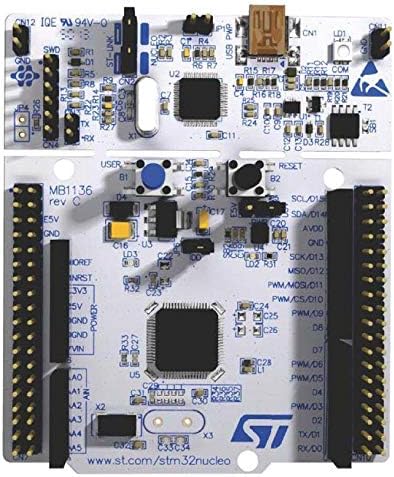
STM32 Nucleo-64 Development Board with STM32L476RG MCU NUCLEO-L476RG
Numéro d'article:
7775013
CHF 37
Price Details
Excluding Shipping & Custom charges ( Shipping and custom charges will be calculated on checkout )
*All items will import from États-Unis
0 ratings
Écrire un commentaire
En stock
 Importé depuis la boutique USA
QTY:
Commandez maintenant et recevez votre commande aux alentours du Jeudi, Juin 25
Transaction sécurisée
Ubuy s'engage à protéger votre sécurité et votre confidentialité. Notre système avancé de sécurité des paiements garantit la confidentialité en chiffrant vos informations lors de la transmission grâce aux protocoles AES (Advanced Encryption Standards) et SSL (Secure Socket Layer). Vos coordonnées de paiement sont 100 % sécurisées car nous ne partageons pas vos informations de paiement avec des vendeurs tiers.
nos meilleurs partenaires logistiques


Ultra-low-power with FPU ARM Cortex-M4 MCU 80 MHz with 1 Mbyte Flash, LCD, USB OTG, DFSDMOn-board ST-LINK/V2-1 debugger/programmer with SWD connector

Livraison
rapide

Retour
gratuit*

Emballage sécurisé

Produits 100 % originaux

Conformité PCI DSS

Certifié ISO 27001


Note: Step Down Voltage Transformer required for using electronics products of États-Unis store (110-120). Recommended power converters Acheter maintenant.


Ce qui se démarque
Low-Power MCU
Equipped with the STM32L476RG, this board offers exceptional low-power performance, ideal for battery-operated applications, ensuring longer operational life without compromising functionality.
Versatile Development
Supports various Arduino shields and allows rich connectivity options, making it suitable for a wide range of projects from IoT to wearable devices, appealing to both hobbyists and professionals.
Open-Source Ecosystem
Integrates seamlessly with the STM32Cube software development platform, providing extensive libraries and middleware, which accelerates project development and enhances coding efficiency for users.
Détails du produit
- Ultra-low-power with FPU ARM Cortex-M4 MCU 80 MHz with 1 Mbyte Flash, LCD, USB OTG, DFSDM
- On-board ST-LINK/V2-1 debugger/programmer with SWD connector
- Can be powered from USB
- Three LEDs, Two Push-buttons
- Support of wide choice of Integrated Development Environments (IDEs) including IAR, ARM Keil, GCC-based IDEs
| Item Weight | 0.51 lbs (230 grams) |
À qui est-ce destiné ?

-
Embedded System Developers
Ideal for developers creating low-power embedded systems utilizing the STM32L476RG microcontroller with efficient features.
-
Prototyping Enthusiasts
Great for hobbyists and engineers who are prototyping applications, thanks to its varied interfaces and expansion options.
-
Educational Purposes
Effective for teaching students about microcontrollers and development boards due to its user-friendly design and ample resources.

-
High-Performance Applications
Not suitable for applications requiring high processing power or advanced features beyond the capabilities of STM32L476RG.
-
Beginner Programmers
May overwhelm beginners unfamiliar with embedded programming concepts and STM32 development environment without proper guidance.
-
Limited Budget Users
Higher cost compared to basic development boards may not appeal to users with tight budgets or financial constraints.
DESCRIPTION DU PRODUIT
STM32 Nucleo-64 Development Board with STM32L476RG MCU NUCLEO-L476RG
Vous avez une question ? Chattez avec nous
Questions et réponses des clients
-
question:
What is the STM32 Nucleo-64 Development Board with STM32L476RG MCU used for?
répondre: The STM32 Nucleo-64 Development Board with STM32L476RG MCU is primarily used for designing and prototyping low-power applications like IoT devices, wearables, and various sensor-based projects. This board provides developers with an easy way to start exploring the capabilities of the STM32L4 series microcontrollers, which are known for their energy efficiency. It is also equipped with a variety of expansion options, allowing integration of shields to enhance functionality. For example, when developing a health-monitoring system, you can easily attach additional sensors to monitor vital signs. -
question:
What are the key features of the STM32L476RG MCU?
répondre: The STM32L476RG MCU boasts several key features, including a high-performance ARM Cortex-M4 core, a maximum clock frequency of 80 MHz, and a rich set of peripherals. Additionally, it includes low-power modes, which make it perfect for battery-operated devices. The microcontroller also has integrated support for various communication protocols such as I2C, SPI, and UART, enhancing its versatility in applications. In practice, this allows you to use the MCU for complex tasks such as real-time signal processing, or data acquisition from multiple sensors seamlessly. -
question:
Can I use the STM32 Nucleo-64 with Arduino shields?
répondre: Yes, the STM32 Nucleo-64 Development Board is compatible with Arduino shields, allowing you to utilize a wide range of existing Arduino add-ons. This feature significantly expands the board's functionality, as you can easily attach various sensors and modules available in the Arduino ecosystem. For instance, if you want to build a smart home application, you can connect an Arduino-compatible Wi-Fi shield to the Nucleo board, enabling remote control functionalities for your project. -
question:
How do I program the STM32 Nucleo-64 Development Board?
répondre: Programming the STM32 Nucleo-64 Development Board can be done using various Integrated Development Environments (IDEs) such as STM32CubeIDE, Keil MDK, or even the open-source PlatformIO. These platforms support C/C++ programming and provide libraries that simplify peripheral access and configuration. You can develop your application on the IDE, then upload it via the onboard ST-LINK/V2-1 debug probe. A typical scenario could involve using the STM32CubeIDE to develop a temperature monitoring application that reads data from a connected sensor to display on an LCD. -
question:
What types of projects can I create with the STM32 Nucleo-64?
répondre: You can create a wide variety of projects with the STM32 Nucleo-64, ranging from simple LED blinkers to complex IoT devices. Some popular projects include environmental monitoring systems, home automation solutions, and fitness trackers. The board's low power consumption makes it especially suitable for wearable devices. For example, you could implement a heart rate monitor using this development board, which collects data from a pulse sensor and transmits it wirelessly to a smartphone app. -
question:
Is the STM32 Nucleo-64 Development Board suitable for beginners?
répondre: Yes, the STM32 Nucleo-64 Development Board is highly suitable for beginners due to its user-friendly design and extensive community support. It is designed to help newcomers get started with microcontroller programming and embedded systems. Numerous tutorials and example codes are available online that can guide you through your first projects. For instance, a beginner might start by following an online tutorial to create a basic LED blinking project, which serves as a simple introduction to programming with STM32. -
question:
What voltage levels can the STM32 Nucleo-64 Development Board operate on?
répondre: The STM32 Nucleo-64 Development Board operates at a voltage level of 3.3V, which is standard for many microcontroller applications. This voltage level is critical for ensuring compatibility with various sensors and peripherals designed for low-power applications. Additionally, the board features built-in voltage regulators to manage power supply effectively. For example, when you connect a 5V sensor to the board, the regulator will appropriately convert it to 3.3V, safeguarding the components while maintaining functionality. -
question:
What development software is recommended for use with the STM32 Nucleo-64?
répondre: Recommended development software for the STM32 Nucleo-64 includes STM32CubeIDE, which integrates development and debugging tools in one platform, and STM32CubeMX, which simplifies the configuration of peripherals. Additionally, other IDEs like Arduino IDE or PlatformIO can be utilized for simpler programming tasks. These tools support a wide range of libraries and examples to get you started quickly. For instance, using STM32CubeMX, you can configure GPIO pins easily for your projects and generate initialization code automatically. -
question:
What is the memory capacity of the STM32L476RG MCU?
répondre: The STM32L476RG MCU offers a substantial memory capacity, featuring 1 MB of flash memory and 128 KB of SRAM. This capacity enables you to manage more complex applications and store larger programs effectively. This characteristic is particularly beneficial for applications such as data logging or crafting sophisticated algorithms. For example, a user could implement a weather station project that logs environmental data over time, leveraging the flash memory for extensive data storage. -
question:
Where can I buy the STM32 Nucleo-64 Development Board with STM32L476RG MCU in Switzerland?
répondre: You can purchase the STM32 Nucleo-64 Development Board with STM32L476RG MCU from Ubuy, which offers a wide selection of electronic components and development boards. Ubuy provides a reliable platform for acquiring tech products, ensuring you get legitimate goods with various delivery options available. By shopping on Ubuy, you can take advantage of special deals and promotions that might enhance your overall purchasing experience.
STMicroelectronics Single Board Computers Editorial Review
The Stmicroelectronics Dev Board, Arduinombed Nucleo - NUCLEO-L476RG is a good learning tool that comes with books making it easy for users. It was delivered fast and is described as a quality product. However, to use it, one has to buy an extra cable and there were some concerns with the specs of the board received. The development board is compatible with Micropython but lacks a USB-OTG connector for file transfer which means files must be transferred via serial.
Avis et évaluations clients
1 évaluations des clients
-
5 étoile
100%
-
4 étoile
0%
-
3 étoile
0%
-
2 étoile
0%
-
1 étoile
0%
Donnez votre avis sur ce produit
Partagez votre avis avec d'autres clients
Avantages
- Good learning tool with accompanying books.
- Fast delivery and good quality product.
- Compatible with Micropython.
Les inconvénients
- Requires an extra cable to use.
Historique des prix du produit
Informations importantes
- Limitations : Pour les produits expédiés à l'international, veuillez noter que toute garantie du fabricant peut ne pas être valide ; les options de service du fabricant peuvent ne pas être disponibles ; les manuels, instructions et avertissements de sécurité des produits peuvent ne pas être dans les langues du pays de destination ; les produits (et les matériaux qui les accompagnent) peuvent ne pas être conçus conformément aux normes, spécifications et exigences d'étiquetage du pays de destination ; et les produits peuvent ne pas être conformes à la tension et aux autres normes électriques du pays de destination (nécessitant l'utilisation d'un adaptateur ou d'un convertisseur le cas échéant). Il incombe au destinataire de s'assurer que le produit peut être importé légalement dans le pays de destination. En cas de commande auprès d'Ubuy ou de ses filiales, le destinataire est l'importateur officiel et doit se conformer à toutes les lois et réglementations du pays de destination.
- Tous les produits listés sur Ubuy ne sont pas à vendre, Ubuy étant un moteur de recherche mondial. Les produits sont soumis aux réglementations en matière d'exportation et de commerce.
CHF 37
Commandez maintenant et recevez votre commande aux alentours du Jeudi, Juin 25
This item is not restrict in my country.(Please click on above link if this item is not restrict in your country, So our team will review and allow.)
QTY:
Transaction sécurisée
Ubuy s'engage à protéger votre sécurité et votre confidentialité. Notre système avancé de sécurité des paiements garantit la confidentialité en chiffrant vos informations lors de la transmission grâce aux protocoles AES (Advanced Encryption Standards) et SSL (Secure Socket Layer). Vos coordonnées de paiement sont 100 % sécurisées car nous ne partageons pas vos informations de paiement avec des vendeurs tiers.
nos meilleurs partenaires logistiques
Livraison transfrontalière la plus rapide
Caractéristiques et avantages
- Ultra-low-power, high performing Microcontroller Unit(MCU) with ARM Cortex-M4 CPU
- On-board debugger/programmer with SWD connector
- Compatibility with various IDEs
- USB power input option
- Equipped with: 3 LEDs, 2 Push-buttons
- 1 Mbyte Flash Memory for storage