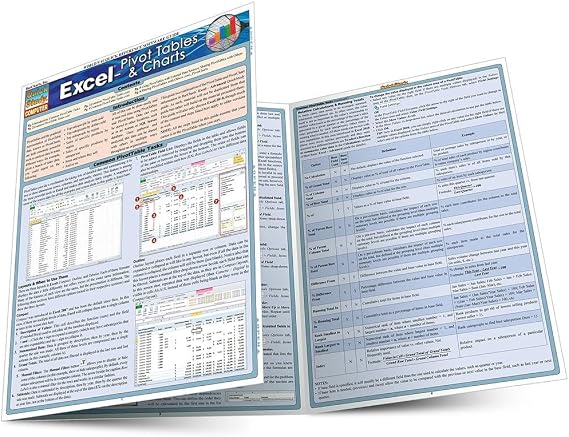
Excel: Pivot Tables & Charts (Quick Study Computer)
Find out how PivotTables and PivotCharts can work for you with our jam-packed 3-panel guide.
Excel: Pivot Tables & Charts (Quick Study Computer)
Numéro d'article: 6858035

Excel: Pivot Tables & Charts (Quick Study Computer)

Numéro d'article: 6858035

CHF 6

Price Details

Excluding Shipping & Custom charges ( Shipping and custom charges will be calculated on checkout )

*All items will import from États-Unis

En stock
États-Unis Importé depuis la boutique USA

QTY:

Commandez maintenant et recevez votre commande aux alentours du Samedi, Juin 27
nos meilleurs partenaires logistiques
  • fedex
  • dhl
Find out how PivotTables and PivotCharts can work for you with our jam-packed 3-panel guide.
Garantie U-Care :
Aucun
Sélectionnez un forfait
fast shipping

Livraison
rapide

free return

Retour
gratuit*

Emballage sécurisé

Emballage sécurisé

Produits 100 % originaux

Produits 100 % originaux

pci-dss

Conformité PCI DSS

iso certified

Certifié ISO 27001


paypal payment
visa payment
mastercard payment
Note: Step Down Voltage Transformer required for using electronics products of États-Unis store (110-120). Recommended power converters Acheter maintenant.

Ce qui se démarque

Compact Size
This laminated reference guide is easy to carry, making it a convenient tool for quick on-the-go Excel consultations, catering perfectly to professionals and students alike.
Visual Aids
The guide includes clear charts and diagrams, enabling users to quickly grasp complex pivot table concepts, effectively reducing learning time and enhancing productivity.
Durable Material
Made from high-quality, laminated material, this guide is resistant to wear and tear, ensuring longevity and allowing users to frequently reference without damage.

Détails du produit

Shop Excel: Pivot Tables & Charts (Quick Study Computer) online at a best price in Switzerland. 1423216431
  • Microsoft Excel software offers data analyzing features
  • PivotTables and PivotCharts are highly useful features
  • 3-panel guide with step-by-step instructions and screen shots
  • Learn how to utilize PivotTables and PivotCharts effectively
  • Jam-packed guide for easy reference
  • Published by dive Publisher
Item Weight0.2 lbs (90 grams)

À qui est-ce destiné ?

Suitable For
  • Beginner Users

    Ideal for beginners who need a concise guide to understand pivot tables and charts in Excel.

  • Students & Educators

    Useful for students and educators requiring quick references for Excel data analysis in projects and assignments.

  • Data Analysts

    Beneficial for data analysts seeking a quick reference tool for creating and understanding data visualizations.

Not Suitable For
  • Advanced Users

    Not suitable for advanced users who may require more detailed and comprehensive resources for complex tasks.

  • Professionals Without Excel

    Inapplicable for professionals who do not use Excel or require different software for data analysis.

  • Non-Visual Learners

    May not meet the needs of non-visual learners who prefer interactive or hands-on training methods.

DESCRIPTION DU PRODUIT

Excel: Pivot Tables & Charts (Quick Study Computer)

Vous avez une question ? Chattez avec nous

Questions et réponses des clients

  • question: What is the Excel: Pivot Tables & Charts QuickStudy Laminated Reference Guide?

    répondre: The Excel: Pivot Tables & Charts QuickStudy Laminated Reference Guide is a comprehensive pamphlet designed to provide users with essential information on creating and manipulating pivot tables and charts in Excel. It condenses key concepts, formulas, and step-by-step instructions into a convenient format, making it a valuable reference for both novice and experienced users. This guide is especially useful for professionals needing quick access to vital functionalities during their data analysis tasks.
  • question: How can the QuickStudy guide help me improve my Excel skills?

    répondre: The QuickStudy guide serves as an effective tool for enhancing your Excel skills by providing concise explanations of pivot tables and charts. Its user-friendly layout allows for quick consultation and easy comprehension of complex concepts, making it ideal for learning on-the-go. By frequently referring to this guide, you can familiarize yourself with advanced features and gain confidence in using Excel for data analysis, reporting, and visualization.
  • question: Is the guide suitable for beginners in Excel?

    répondre: Yes, the guide is suitable for beginners as it introduces fundamental principles of pivot tables and charts in a clear and straightforward manner. The laminated format ensures durability, allowing beginners to reference it while practicing in Excel. By breaking down complicated procedures into manageable steps, the guide equips novices with the necessary skills to efficiently organize and analyze data, helping set a strong foundation for advanced Excel functionalities.
  • question: Are the pivot table instructions in the guide applicable to all versions of Excel?

    répondre: The instructions in the QuickStudy guide are primarily based on the most commonly used versions of Microsoft Excel. While the core features of pivot tables and charts typically remain consistent across versions, minor variations in the interface may occur. Users should review their specific version's toolbar for slight discrepancies. Nevertheless, the fundamental concepts and techniques presented in the guide will still enhance your understanding and practical application of Excel functionalities.
  • question: Can I use this guide for professional data analysis?

    répondre: Absolutely, the QuickStudy guide is an excellent resource for professionals engaged in data analysis. It provides valuable insights and quick references that can enhance your efficiency when manipulating data using pivot tables and charts. The guide enables you to understand how to effectively summarize large data sets, create visual representations, and generate insightful reports, all of which are crucial skills in the professional world.
  • question: What format is the QuickStudy reference guide available in?

    répondre: The QuickStudy reference guide is available in a laminated pamphlet format. This design prioritizes convenience and accessibility, allowing you to easily handle it while working on your computer. The laminated finish protects against wear and tear, making it suitable for frequent use, ensuring that you can refer to it without worry during data projects or presentations, whether at the office or home.
  • question: How can I quickly find the information I need in the guide?

    répondre: The QuickStudy guide is organized in a structured manner, with sections clearly labeled for easy navigation. Users can identify keywords or functions they are looking for, allowing them to quickly locate the relevant information. This strategic layout is particularly beneficial during time-sensitive tasks where immediate reference is required, enabling effective learning and application of pivot tables and charts in real time.
  • question: What are some practical scenarios where this guide would be useful?

    répondre: This guide can be extremely helpful in various scenarios, such as preparing financial reports, conducting market analysis, or summarizing performance metrics. For instance, a marketing professional could use it to analyze campaign performance data through pivot tables, identifying trends and visualizing results effectively. Similarly, a project manager may utilize the guide to create charts that present project timelines, resource allocation, and budgets to stakeholders seamlessly.
  • question: Where can I buy the Excel: Pivot Tables & Charts QuickStudy Laminated Reference Guide in Switzerland?

    répondre: You can purchase the Excel: Pivot Tables & Charts QuickStudy Laminated Reference Guide on Ubuy in Switzerland. Ubuy is a trusted online platform that offers a variety of educational and reference materials, making it an ideal choice for acquiring this handy guide. By shopping on Ubuy, you can conveniently access detailed product information and place your order with confidence.
  • question: Does the guide cover advanced Excel functionalities?

    répondre: While the primary focus of the QuickStudy guide is on pivot tables and charts, it does touch upon some advanced functionalities associated with these features, such as groupings and calculations. However, for in-depth coverage of other advanced Excel functions, additional resources may be necessary. Nevertheless, the guide lays a solid groundwork for users who wish to eventually delve into more complex data analysis techniques using Excel.

QuickStudy Editorial Review

The Excel: Pivot Tables & Charts Quick Study Computer Pamphlet is a compact guide that provides information on using pivot tables and charts in Excel. While the pamphlet is praised for its informative content and ease of use, some customers have expressed concerns about the small font size and outdated information. Reviewers appreciated the inclusion of useful information and found the guide easy to follow, especially when using Excel simultaneously. They also commended the sturdiness of the pamphlet. However, a few customers mentioned that the typeface is too small, making it difficult to absorb or quickly reference the information. Additionally, some reviewers noted that the publication was outdated, having been published in May 2011. This led them to believe that it might not be the most up-to-date resource, suggesting that it may be more convenient to search for information online instead. Overall, the Excel: Pivot Tables & Charts Quick Study Computer Pamphlet appears to be a helpful resource for those looking to learn about pivot tables and charts in Excel. However, the small font size and outdated content may pose challenges for some users.

Avis et évaluations clients

5.0
1 évaluations des clients
  • 5 étoile
    100%
  • 4 étoile
    0%
  • 3 étoile
    0%
  • 2 étoile
    0%
  • 1 étoile
    0%

Donnez votre avis sur ce produit

Partagez votre avis avec d'autres clients

Avantages

  • Informative content on pivot tables and charts
  • Easy to follow along with while using Excel
  • Sturdy Construction

Les inconvénients

  • Small font size

Historique des prix du produit

Informations importantes

  • Limitations : Pour les produits expédiés à l'international, veuillez noter que toute garantie du fabricant peut ne pas être valide ; les options de service du fabricant peuvent ne pas être disponibles ; les manuels, instructions et avertissements de sécurité des produits peuvent ne pas être dans les langues du pays de destination ; les produits (et les matériaux qui les accompagnent) peuvent ne pas être conçus conformément aux normes, spécifications et exigences d'étiquetage du pays de destination ; et les produits peuvent ne pas être conformes à la tension et aux autres normes électriques du pays de destination (nécessitant l'utilisation d'un adaptateur ou d'un convertisseur le cas échéant). Il incombe au destinataire de s'assurer que le produit peut être importé légalement dans le pays de destination. En cas de commande auprès d'Ubuy ou de ses filiales, le destinataire est l'importateur officiel et doit se conformer à toutes les lois et réglementations du pays de destination.
  • Tous les produits listés sur Ubuy ne sont pas à vendre, Ubuy étant un moteur de recherche mondial. Les produits sont soumis aux réglementations en matière d'exportation et de commerce.